
Owners manual
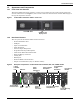
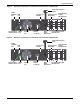
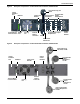
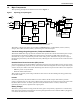
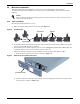
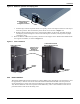

Table Of Contents
- Important Safety Precautions
- Save These Instructions
- Glossary of Symbols
- 1.0 Product Description
- 1.1 Features
- 1.2 Available Models
- 1.3 Appearance and Components
- 1.3.1 Front Panel and Controls
- 1.3.2 Rear Panel Features
- Figure 2 Rear panel components—Liebert GXT4 120V rack/tower, 500, 700, 1000VA model
- Figure 3 Rear panel components—Liebert GXT4 120V rack/tower, 1500VA model
- Figure 4 Rear panel components—Liebert GXT4 120V rack/tower, 2000VA model
- Figure 5 Rear panel components—Liebert GXT4 120V rack/tower, 3000VA model
- Figure 6 Rear panel components—Liebert GXT4 208V rack/tower, 3000VA model
- 1.4 Major Components
- 1.5 Operating Mode
- 2.0 Installation
- 3.0 Operation and Display Panel
- Figure 14 Operation and display panel
- 3.1 LED Indicators
- 3.2 Control Buttons
- 3.3 LCD
- 3.4 Menu Structure
- Figure 15 Menu structure
- 3.4.1 Startup Screen
- 3.4.2 Default Screen
- 3.4.3 Main Menu Screen
- 3.4.4 Prompt List
- 3.4.5 Warning List
- 3.4.6 Fault List
- 4.0 Operation
- 5.0 Communication
- 6.0 Maintenance
- 7.0 Troubleshooting
- 8.0 Battery Cabinet
- 9.0 Specifications
- Table 13 Specifications of GXT4-500RT120 - GXT4-700RT120 and GXT4-1000RT120 models
- Table 14 Specifications of GXT4-1500RT120 - GXT4-3000RT120 and GXT4-3000RT208 models
- Table 15 Battery cabinet specifications
- Table 16 Operating temperature parameters
- Table 17 Battery run times
- 9.1 Product Warranty Registration
- 9.2 Technical Support

Installation
13 Liebert
®
GXT4
™
Figure 10 Rotate the operation and display panel
c. Pull the logo on the front plastic bezel cover gently, rotate it 90 degrees clockwise and snap it
back into position. The rotated front plastic bezel cover is shown in Figure 11.
d. Replace the front plastic bezel cover on the Liebert GXT4. At this point, the UPS operation
and display panel and logo have been rotated 90 degrees clockwise, which provides upright
viewing for users.
5. Place the Liebert GXT4 and any battery cabinets on the support bases. Each Liebert GXT4 needs
two support assemblies, as shown in Figure 11.
Figure 11 Tower installation
2.4.2 Rack Installation
The Liebert GXT4 UPS and external battery cabinets (EBC), when installed in a rack enclosure, must
be supported by a shelf or rack-mount rails. The Liebert GXT4 UPS and EBC units ship with all
required hardware to allow rack-mount installation (not included with model numbers that end in
“E”). Because different rack-mount options install differently, refer to the installation instructions
provided with the rack mount kit being used.
Rotate Operation and
Display Panel
90 degrees clockwise
Operation and
Display Panel
Rotated for
Tower Operation
Support
Bases
Support
Bases
Liebert GXT4 UPS
Liebert GXT4 UPS and
External Battery Cabinet