
Owners manual
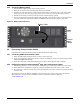
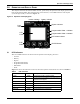
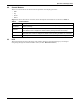
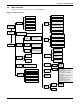
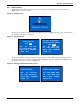
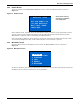

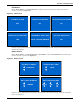
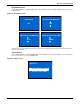
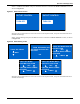
Table Of Contents
- Important Safety Precautions
- Save These Instructions
- Glossary of Symbols
- 1.0 Product Description
- 1.1 Features
- 1.2 Available Models
- 1.3 Appearance and Components
- 1.3.1 Front Panel and Controls
- 1.3.2 Rear Panel Features
- Figure 2 Rear panel components—Liebert GXT4 120V rack/tower, 500, 700, 1000VA model
- Figure 3 Rear panel components—Liebert GXT4 120V rack/tower, 1500VA model
- Figure 4 Rear panel components—Liebert GXT4 120V rack/tower, 2000VA model
- Figure 5 Rear panel components—Liebert GXT4 120V rack/tower, 3000VA model
- Figure 6 Rear panel components—Liebert GXT4 208V rack/tower, 3000VA model
- 1.4 Major Components
- 1.5 Operating Mode
- 2.0 Installation
- 3.0 Operation and Display Panel
- Figure 14 Operation and display panel
- 3.1 LED Indicators
- 3.2 Control Buttons
- 3.3 LCD
- 3.4 Menu Structure
- Figure 15 Menu structure
- 3.4.1 Startup Screen
- 3.4.2 Default Screen
- 3.4.3 Main Menu Screen
- 3.4.4 Prompt List
- 3.4.5 Warning List
- 3.4.6 Fault List
- 4.0 Operation
- 5.0 Communication
- 6.0 Maintenance
- 7.0 Troubleshooting
- 8.0 Battery Cabinet
- 9.0 Specifications
- Table 13 Specifications of GXT4-500RT120 - GXT4-700RT120 and GXT4-1000RT120 models
- Table 14 Specifications of GXT4-1500RT120 - GXT4-3000RT120 and GXT4-3000RT208 models
- Table 15 Battery cabinet specifications
- Table 16 Operating temperature parameters
- Table 17 Battery run times
- 9.1 Product Warranty Registration
- 9.2 Technical Support

Operation and Display Panel
19 Liebert
®
GXT4
™
3.4.1 Startup Screen
When the Liebert GXT4 is starting up, it initiates a self-test and displays the screen shown in
Figure 16 for about 10 seconds.
Figure 16 Startup screen
After about 10 seconds, the LCD shows one of the On screens in Figure 17; the screen shown depends
on whether input power is available.
Figure 17 Startup screens
To turn On the UPS, press either the Up or Down button to select YES and press the Enter button.
The UPS will start up, the LCD will display UPS STARTING and then START SUCCESSFUL after
the UPS is turned On, as shown in Figure 18.
Figure 18 Starting and Start Successful screens
EMERSON
Network Power
O/P: 0V HZ 0.0A
I/P : 120 V 60HZ 0.0A
BATT: 100 % 320 MINS
LOAD: 0%
TURN ON UPS
YES NO
O/P: 0V 0HZ 0.0A
I/P : 120V 60HZ 0.0A
BATT: 100% 320MINS
LOAD: 0%
AC NOT AVAILABLE
START ON BATTERY?
YES NO
Input Power is Available
Input Power is not Available
O/P: 0V 0HZ 0.0A
I/P : 120V 60HZ 0.0A
BATT: 100% 320MINS
LOAD: 0%
UPS STARTING
O/P: 120V 60HZ 4.6A
I/P : 120V 60HZ 5.0A
BATT: 100% 15MINS
LOAD: 40%
START SUCCESSFUL