
User guide


|
5
HyperControl for Logic Pro
|
User Guide
HyperControl with Axiom Pro Hardware
9
8
10 11 2 536
1 4 7
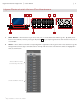
1. Slider Buttons
4
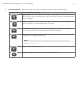
– These buttons let you select, mute, solo, or record-enable tracks within Logic Pro. By default, these
buttons select channels, however, pressing the Flip button
4
lets you step through the three other functions: mute, solo, or
record-enable.
2. Sliders
4
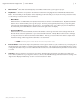
– These sliders control their corresponding bank of eight faders in the Logic Pro mixer. Note that in the Logic Pro
Arrange window, the left edges of all tracks that are currently under the control of the Axiom Pro sliders are highlighted in
white, as shown below:
Selected Bank of Tracks
(Controlled by Axiom Pro)
Unselected Bank of Tracks
4
Only available on Axiom Pro 49/61.