
User guide

|
6
HyperControl for Logic Pro
|
User Guide
3. Master Slider
5
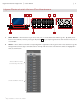
– This slider automatically maps to the Master Fader track of your Logic Pro project.
4. Flip Button
5
– Axiom Pro can operate in two different modes when using HyperControl: Mixer Mode and Instrument
Mode. The functionality of the Flip button varies depending on the mode that you are in (the “F1” F-Key selects the mode;
see the “F-Keys” section below for more information).
• Mixer Mode:
When Axiom Pro is in Mixer Mode, the flip button determines the function of the Slider buttons. By default, the Slider
buttons choose channels within your Logic Pro project. However, pressing the Flip button lets you step through the
other functions that the Slider buttons can perform (i.e., record-enable, mute, solo). When you press the Flip button,
the functionality of the Slider Buttons is listed near the lower-right side of the display.
• Instrument Modes:
When Axiom Pro is in Instrument Mode, the Axiom Pro Sliders control Logic Pro track volume settings whereas the
Encoder knobs control the parameters of your selected virtual instrument. The Flip Button can be used to exchange
(or “flip”) the function of the Encoder knobs and the Sliders. This lets you use the Axiom Pro sliders to adjust virtual
instrument settings, while using the Encoder knobs to set track levels.
✓ NOTE: Switching back to Mixer Mode will cancel Flip Faders mode.
5. Encoder Knobs – These knobs map to the parameters of the Logic Pro tracks (i.e., pan, send level, etc.), insert plug-ins, or
virtual instrument controls that are currently selected through Axiom Pro. The “Using Logic Pro with HyperControl” section
of this guide describes how you can select different kinds of track, insert, and virtual instrument parameters for these knobs
to control.
6. Soft-Keys – These four buttons correspond to the “Pages” displayed along the bottom of the LCD screen and let you
access various parameters of your Logic Pro tracks (i.e., insert, send, and EQ settings) and virtual instrument settings. The
“HyperControl Display and Soft-Keys” section covers these buttons in detail.
5
Only available on Axiom Pro 49/61.