
Operating instructions


(Retrofit Installations - cont.)
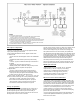
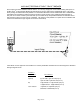
14. Plug the POWERVAR UPM into the receptacle located on the right hand side exterior of the MVPN. Plug the cable coming
from the top of the MVPN into one of the receptacles on the back of the POWERVAR UPM.
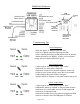
15. Turn on the POWERVAR UPM by pressing the “on/off” switch (right hand of front panel) and holding for several seconds until
the row of 6 status indicator lights at the bottom of the bezel begins to illuminate. Allow the UPM to go through the self test mode;
which is finished when the green indicator light with the AC power symbol (2nd from left) illuminates continuously and all the others
go off. See the POWERVAR UPM manual if any conditions other than the one described occurs.
16. IMPORTANT NOTE: If the input circuit breaker to the MVPN trips off during the startup of the POWERVAR UPM, it is
typically not a problem with the UPM but with the circuit breaker itself. The circuit breaker should be replaced with one
that is rated for High Magnetic inrush loads. See Page 6 in this manual for more information.
17. Turn the Transfer Switch on the MVPN to the LEFT which is the “Normal” position.
18. Reinstall the MVPN front cover using the ten screws removed in step 4.
19. Advise local management that the installation is complete and all the “Critical Electronic Systems” that are tied in will have
battery backup, power isolation, and surge protection. Show local management the “input” and “output” pilot lights on the MVPN
and how to use the “Bypass” switch in the event of UPM failure or service. See Page 7 in this manual for more information. Also
review POWERVAR UPM operation and provide the operation manual / POWERVAR “e library” CD to local management.
New Installations
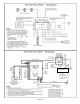
For all new installations, follow the previous instructions except for Step 9 through Step 11. In new installations, critical
equipment circuits can be piped directly into the MVPN and connected directly to the MVPN terminal blocks.
Warranty Information
Mac Victor Power warrants the Mac Victor Power Network (known hereafter as the "product") to be free from defects
in material and workmanship for a period of five years from the date of shipment. POWERVAR warrants its Security
One UPM or Uninterruptible Power Manager series (known hereafter as “the product”) to be free from defects in
material and workmanship for a period of five years (two years on batteries) from the date of shipment. The product
will be repaired or replaced at no charge during this warranty period. There are no other warranties, expressed or
implied, of merchantability, fitness for a particular purpose, performance, condition, capacity, or otherwise. Neither
Mac Victor Power nor POWERVAR is liable for incidental or consequential damages, monetary loss, loss of sales, or
loss of business resulting from the failure or malfunction of the product. Warranty is void on product that is misused,
misapplied, abused, altered by unauthorized personnel or where evidence of tampering exists. The foregoing
constitutes the sole and exclusive remedy of the purchaser and is in lieu of all other warranties. No greater degree of
liability is imposed on Mac Victor Power or POWERVAR, Inc.
Technical and Service Assistance
Technical and service assistance is available in North America between the hours of 8:00 a.m. and 5:00 p.m. Central
Time by calling 800-369-7179 (in Illinois, call (847) 596-7000.
Customer Service
For service, obtain the model number, part number, and serial number from the rear panel data plate. Then contact
either Mac Victor Power or POWERVAR via phone or web to obtain a Return Material Authorization (RMA) number.
This number must be marked on the shipping container and packing slip of the unit being returned. The original
shipping container should be used if available. Additional charges will apply for repair of damages caused by improper
packing of the returned unit. Unauthorized return shipments will be refused. Units for repair must be shipped prepaid
to the return address provided with the Return Material Authorization.
Page 3 of 8