
Operating instructions

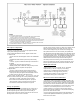
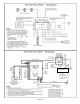
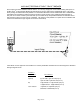
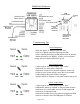

POWERVAR UPM Details
(
Push to Start
)
Input Power from
Mac Victor
receptacle
(
Each LED = 20%
)
Cooling
Fan
(
Each LED = 20%
)
Input Power
from
Mac Victor
receptacle
Serial Comm Por
t
UPM
Circuit Breaker
Outpu
t
Powe
r
receptacles to
Mac Victor
plug cable
Output Power to
Mac Victor
plug cable
Troubleshooting Tips
Normal Operation
* Both the “Input” & “Output” lights are “ON”
* Switch to “Bypass” only when replacing the UPM
* After replacing & starting up UPM, Switch back to “Normal”
* When the Switch is in “Bypass”, if there is a utility power
outage, the entire power network will go off.
“ON” “ON”
Loss of Input Power
* “Input” light is “OFF” and “Output” light is “ON”
* Indication of a utility power outage OR
* Indication of input circuit breaker tripped or turned off
* If there is not a power outage, check the circuit breaker
* UPM is keeping the power network energized
* Do NOT Switch to “Bypass” or the power network will go off
“OFF” “ON”
“ON” “OFF”
Page 7 of 8
Loss of Output Power
* “Input” light is “ON” and “Output” light is “OFF”
* Immediately Switch to “Bypass” to restore power network
* Indication of circuit breaker on back of UPM tripped OR
* Indication of UPM failure OR
* Indication that Mac Victor plug cable not plugged into UPM
* Switch to “Normal” after the UPM power is restored