
User Guide
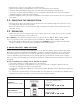


• Remove the screw on the back cover and remove
• Slide off the battery compartment cover, in the direction of the arrows
• Plug the main AC adapter plug into the jack within the battery compartment
• Insert the (3) AAA back-up batteries (not included), taking care to follow the polarity
diagram inside the battery compartment
• Feed the adaptor wire out of the compartment and back cover, and secure the cover with
the screw
3.2 Mounting the indoor Siren
• Remove the Indoor Siren back cover, and screw to the wall through the keyholes, using
the wall plugs and screws provided
• Once the back cover is secured to the wall, re-attach the Indoor Siren body and secure
with the screw
3.3 oPeration
• Make sure the house security code of the Indoor Siren is the same as the house security
code for the main panel (see Section 4)
For example: If the Wireless Panel’s house security code is 1. ON—2. ON—3. ON—4. ON:
Then, the security code of the Indoor Siren should be 1. ON—2. ON—3. ON—4. ON
• Once the Wireless Alarm System is triggered in ALARM mode, the Wireless Panel will
send the signal to the Indoor Siren and both will sound together.
4. HOUSE SECURITY CODE SETTINGS
Unless the factory settings of the MaceAlert™ Solo Wireless Alarm System Panel have been
altered, the House Security Code will NOT need to be changed. However, if the settings on
the panel have been altered, or need to be altered to solve the problem of the panel and
sensors activating intermittently (or not working at all) or interference with other systems,
then the House Security Code on all system modules (sensors and sirens) will also need to be
changed.
House Security Code settings can be altered as follows:
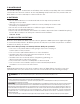
• There are 4 jumpers or dip-switches on each device.
• Remove the [ jumper compartment cover ], then pull out or plug the jumper into the
contacts to change the House Security Code
• If a jumper is plugged it is ON if it is removed it is OFF. Default code is with all the jumpers
plugged
• To ensure the system works correctly, make sure the jumpers on the Wireless Alarm Panel
and all other system modules (sensors and sirens) match exactly.
ON = Pushed in; OFF = Pulled out
Jumpers:
House Security Code
– Wireless Alarm Panel
– Sensors
Default Code:
1: ON, 2: ON, 3: ON, 4: ON
Dip-switches:
House Security Code
– System Controller
Default Code:
1: ON, 2: ON, 3: ON, 4: ON