
M2 Assembly Guide 2_0

10
M2 ASSEMBLY GUIDE
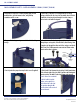
Drew’s Note: The Z-Axis Assembly attaches to the sled with
T-nuts. They are marvels of engineering that are specially
designed to turn sideways when being tightened. This fastens
parts to aluminum extrusions at different angles. Sometimes, you
have to loosen and retighten them to get them to turn.
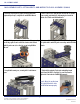
1. Mount Z-Axis assembly to sled by aligning extrusion “legs”
with the two rail “feet” that are already attached to the sled.
2. Pop the caps off the end of the rail feet. Line up leg extrusions,
with bottom bolt sticking out, about 2mm. Slide the extrusion
legs onto the rail feet until it threaded holes line up on the side.
3. Insert longer Z2 bolts into holes on each side to secure.
Tighten using Z5 Allen Wrench.
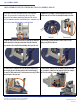
4. Attach four Z1 L-brackets to each side of the extrusion legs.
Ensure that they turn sideways and lock the L-bracket in place.
Use two Z4 T-Nuts and shorter Z3 bolts per bracket using Z5 Allen
wrench. Replace the end caps.
5. Attach router clamp to Z-Axis Assembly using the bolts that
are screwed into clamp. Unscrew them and attach the clamp to
the Z-Axis Assembly as shown with Z5 Allen Wrench.
M2 ASSEMBLY PART 3B: FINISH M2 Z-AXIS ASSEMBLY (BAG Z)
Rail Foot Extrusion Leg
This work is licensed under the creative commons Attribution
Non Commercial-No Derivatives 4.0 International license. Last Updated 1.18.2021
Version 2.0