
Quick Start Guide


Connecting your Mako
Please do not connect your Mako into
the power outlet until all the cables
and antennas have been attached.
Your Mako 4600 appliance gets its
conguration from the Mako Central
Management System (CMS). Your Mako
reseller should have precongured a
prole for your Mako 4600 appliance in
the CMS and should also have provided
you with login credentials to access the
CMS to control and manage your Mako.
The Mako CMS can be accessed by
clicking the login link at:
https://www.makonetworks.com/
There are two CMSs, PCI and non-PCI.
PCI stands for Payment Card Industry.
Please use the PCI CMS login link
unless told otherwise by your Mako
reseller.
Connect a LAN port to your network
switch. In smaller networks, the Mako
could connect directly to a single device,
like a PC.
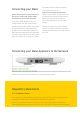
Connecting your Mako Appliance to the Network
LAN Port 2 should be connected to your existing local network.
Regulatory Statements
FCC Compliance Notice
Any changes or modications not expressly approved by the party responsible for
compliance could void your authority to operate the equipment.
Note: This equipment has been tested and found to comply with the limits for a
Class B digital device, pursuant to par 15 of the FCC Rules. These limit are designed