
User's Manual
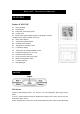




1. Press HOUR/+ to set the hour.
2. Press MIN/- to set the minutes.
3. Press Snooze to toggle alarm on and off. When the alarm is set ON, the Unit will emitted a
sound.
When Alarm Sounds
a. will flash.
b. Press Snooze to snooze the alarm for 5 minutes. After that the alarm will sound again.
c. Press ANY other key to turn the alarm sound off. If not manually interrupted,
the alarm sound will automatically stop after one minute.
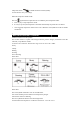
MOON PHASES
Throughout the 28 days of the lunar month, the aspect of the moon changes. Indeed, the moon,
being spherical, is always half lightened up by the sun. As the moon rotates around the Earth, the
appearance of its lightened side changes continuously. This phenomenon creates moon phases.
The moon phase is automatically updated according to the year/ month/day.
Moon Phase Display
TEMPERATURE & HUMIDITY DISPLAY
*Check Inside Temperature and humidity
After inserting the batteries, the local temperature and humidity will be displayed.
1. Press CHN to toggle between the data of your various remote sensors: Outside 1 (channel 1),
Outside 2 (channel 2) Outside 3(Channel 3) and Outside 4 (channel 4). Temperature and
humidity readings will alternate on the receiver.
Note: if you do not have any additional sensors, please disregard this function.
°C or °F Temperature Display