
User's Manual




2. Toggle between °C and °F by pressing Snooze in Clock 2 mode.
3. Press HOUR/+ in Clock 1 mode to display maximum/minimum temperature and humidity
records.
Display HI & LO
"Hi" and "Lo" displayed onscreen mean that the temperature or humidity is outside the range of
specification.
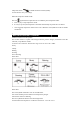
TEMPERATURE & HUMIDITY TREND
The trend indicator shows the trend of temperature & humidity determined by the particular sensor
in the past half hour interval.
TEMPERATURE ALARM
You can set high temperature or low temperature alarms for one local channel and for one remote
channel.
Local temperature alarm
1. Scroll to temperature alarm mode by using MODE (Inside).
2. The default value 14°C or existing preset will flash.
3. Press Hour/+ or Minute/– keys to set the temperature limit value.
4. Press Snooze key continuously to scroll and select the high temperature alarm ,
low temperature alarm or disable the alarm function (blank).
5. Press mode to save your settings.
Outdoor temperature alarm
1. Scroll to remote channel temperature alarm mode by using mode.
2. Press CHN to select the channel of the desired transmitter.
3. The default value 14°C or existing preset will flash.
4. Press Hour/+ or Minute/– keys to set the temperature limit value.
5. Press Snooze key continuously to scroll and select the high temperature alarm , low