
User manual


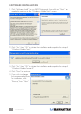



Therecordingsizecanbefrom352x240to720x480(NTSC)or352x288
to720x576(PAL).Largeraudioandvideobitratesusemorediskspace,but
provide better audio and video quality. If space is limited, therefore, adjust the
recording setting as needed to save long programs with high-quality images.
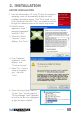
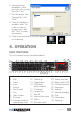
Path Setting
Click on the Directory
Setting tab to save still
images or video files.
Then,tocheck/conrm
their path, click on the
adjacent“Browse”button.
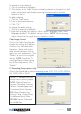
Miscellaneous Right-
Click Options
Various other options and
alternative menu access
routes are available by
right-clicking, which
displays a pop-up menu
with the following
selections.
Always on top: Keeps the television display on top of any others that are active.
Display panel: Displays or hides the software control panel.
Full-screenmode:Enlargesthewindowtofull-screensize.Double-clickingonthe
screen returns the image to window mode.
TeleText: Supports the TeleText function.
Desktop mode: Displays the TV image on the computer desktop.
Video input: Presents three options: TV Tuner, Composite and S-video. The
default is TV Tuner.
Videostandard:ChangesthevideoformattoPAL/NTSC/SECAM.Thedefault
isPAL-BDGHI.
Color adjust: Adjusts the color and brightness.
Capture: Takes a single-frame snapshot. The default format saves the image as a
.bmp file.
Channel list: Lets you edit the channels. For details, see Channel Edit on Page 8.
Directory setting: Lets you select which directory to save recordings and images
to. For details, see Path Setting above.
About: Shows the program version and copyright information.
Exit: Exits the program.
10
OPERATION