
User manual





2. hArdwAre ConneCTIons
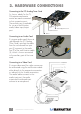
Connecting to the PCI Analog Tuner Card
As shown, cables for the TV,
FM antenna and remote
control are each connected
to their respective ports.
The auxiliary port is available
for use as a multi-function
audio/videoinput/output
port.
Connecting to an Audio Card
Ifusinganaudiocard(shownat
right beneath the PCI Analog
TunerCard),notethatthecable
from the sound card line input
port(1)connectstotheaudio
line(2)ofthemulti-functioncable
(3),whichisshownconnected
to the auxiliary port of the tuner
card.
Connecting to a Video Card
If using a video card, the video source can
be connected using the multifunction cable
either directly to the composite connection
or indirectly to the S-video connection.
The audio cable connects to the
audioinputport;theaudio
output and sound card input
connect to a microphone.
4
HARDWARECONNECTIONS
Infrared (IR) Remote Port
Auxiliary
Port
FM Antenna Port
TV Port