
User manual





3. InsTAllATIon
drIVer InsTAllATIon
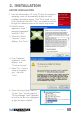
1.Insertthesoftware/driverCDintheCDdrive.Thecomputer’s
operating system will automatically display the initial
installationprocedureprompt.Click“DriverInstall”(orrun
Driver\Setup.exe),thenclick“Next”asneededtocontinue
throughthewelcomescreentotheDirectXsetupscreen.
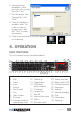
2. Read the license
agreement, select “I
accept the agreement”
and click “Next.”
3.Whenthe“Restart
Computer” screen
displays, click “Finish.”
4. If the “Hardware
Installation” screen
displays, click
“Continue Anyway.”
5. Select “Yes, I want to
restart my computer
now,” then click
“Finish.”
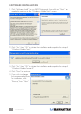
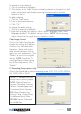
6.Openthecontrolpanel;clickon
“System,” then “System Properties,”
“Device Manager” and “Hardware”
toconrmthedriver(ashighlighted
atright)hasbeeninstalled.
5
INSTALLATION