
Magnum Router User's Guide


Chapter 7: Magnum Router GUI Manager
___________________________________________________________________
7-62
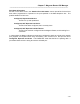
Data Selection
Port Bandwidth
Port Utilization
Estimated Bandwidth in
use
Received Bytes
Received Frames
Transmitted Bytes
Transmitted Frames
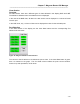
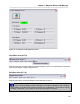
Figure 49 - Magnum Utilization Data Selection Bar
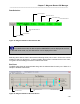
Selecting which data to chart is the same as selecting which port to chart. Click on the column
heading to select or de-select it. A column heading that is green is selected to be on the chart,
non-green column headings will not be included in the chart.
Bar Chart
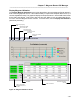
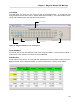
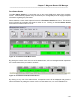
The BAR chart shows all ports selected along with the selected data for each port. Below is a
sample of the BAR chart screen.
General Numbers
Port Names and chart
data
Chart Table description
Figure 50 - Magnum Utilization Bar Chart Screen
In the BAR chart mode, all data except the BANDWIDTH can be displayed at one time.
In the LINE chart mode, only one data column can be displayed at a time.