
Magnum Router User's Guide

Chapter 9: Sample Configurations
___________________________________________________________________
9-33
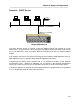
Sample 6 – DHCP Server
IP Address: 10.1.100.250/24
Magnum/Marathon A
Ethernet port
Network: 10.1.100.0/24
PC PC PC Laser printer
The above diagram shows an example of how the Magnum Router can operate as a local
DHCP server. It cannot function as an enterprise level DHCP server, pass DHCP traffic across
any of its WAN ports, does not support BOOTP processing and does not support multiple
scopes..
It will supply to the local IP host device such things as an IP address, WINS addresses (up to 3),
DNS addresses (up to 3), Domain Name and default gateway information.
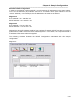
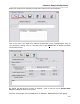
Programming the DHCP server requires that an IP address be entered in the Ethernet
Configuration screen. Multiple IP addresses can be entered in the Ethernet Configuration
screen (up to 255), but only one can be selected to work as the host IP for the DHCP server.
In the above diagram, the Ethernet port of the Magnum Router is programmed for an IP address
of 10.1.100.250 with a subnet mask of 255.255.255.0