
Magnum Router User's Guide

Chapter 7: Magnum Router GUI Manager
___________________________________________________________________
7-6
Baud Rate
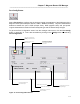
Sets the baud rate for the selected port. Choose from the baud rates available in the drop down
list box.
Notes
The notes field of the Port Settings screen gives a convenient way to document data that is
relevant to the selected port, such as circuit ID, or where the port connects to, etc.
Save
Select Sav
e to save changes to the Magnum Router Manager.
Exit
Select Ex
it to close this screen and return to the Magnum Router Manager main screen.
Baud Rate Notes
A
baud rate denotes the speed of which a serial port is to operate at. The Magnum Route
r
handles baud rates in the following manner:
When the Port Mode is selected as DCE, then the baud rate selected is the reported cloc
k
speed to the attached device. However, if the Port Mode is selected as DTE (which would
accept clock from an external source), the baud rate box changes to a Carrier Rate box and
denotes the accepted clocking speed of an attached device.
The Magnum Router can accept an external clock, but will not report it. Thus, the baud rate
selected when the Port Mode is DTE is for documentation purposes.
However, it is important to note that the DTE baud rate is used for calculating the estimated
bandwidth used in the Port Utilization screen.