
User`s guide
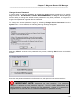
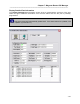
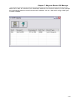
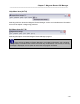
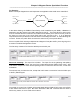
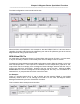
Table Of Contents
- Introduction
- Magnum Router Features
- Pre-Installation
- Installing the Hardware
- Magnum Router Manager Installation
- Logging Onto a Magnum Router
- Magnum Router GUI Manager
- Magnum Router Manager Main Screen
- Toolbar Buttons
- New Config Button
- Port Config Button
- WAN Config Button
- Other WAN Config Buttons
- Master WAN-IP Address
- WAN-IP Route Map
- Advanced Routing
- RIP Version 1 Routing
- Ethernet Config Button
- Micro-Band Voice Over IP
- Save Configuration
- Send Configuration
- Reboot the Magnum Router
- Menu Bar
- Configuration Menu (ALT-C)
- Settings Menu (ALT-S)
- System Menu (ALT-Y)
- Statistics Menu (ALT-T)
- Help Menu Item (ALT-H)
- Exit Menu Item (ALT-X)
- Toolbar Buttons
- Magnum Router Manager Main Screen
- Magnum Router Specialized Functions
- Sample Configurations
- Magnum Router Troubleshooting
- Magnum Router Cable Specifications
- Marathon Port Configuration
- Configuration Worksheets

Chapter 8: Magnum Router Specialized Functions
___________________________________________________________________
8-3
The WAN configuration screen would look like this:
What has been accomplished in this example is that the PUBLIC DLCI of 100 now has the
capability of sending data from the M1 (Marathon) port and the E1 (Ethernet) port to the remote
Magnum Router using a public DLCI of 100.
NON-Virtual DLCI’s
As noted earlier, the Magnum Router is a Frame Relay switch and an IP router. In some cases,
it may be necessary to switch a Frame Relay DLCI from one Magnum Port to another.
The Magnum Router Manager treats WAN Configuration entries differently based on the Input
DLCI and Output DLCI. If the Input DLCI is different from the Output DLCI (Input DLCI 100,
Output DLCI 200 for example), then the Magnum Router Manager assumes that the entry is
going to be used as a virtual DLCI. However, this may not be the case. Clicking the Non-
Virtual DLCI box informs the Magnum Router Manager that this entry is to be treated as a
switched PVC, or just pass data from DLCI 100 to DLCI 200.
For Example:
There is a supplied public DLCI of 100 on WAN1 and the attached FRAD on port WAN2
absolutely needs a DLCI of 105, although this would be a rare case, the Magnum Router
Manager handles this by the Non Virtual DLCI checkbox.
This is what the above example would look like: