
User`s guide


Table Of Contents
- Introduction
- Magnum Router Features
- Pre-Installation
- Installing the Hardware
- Magnum Router Manager Installation
- Logging Onto a Magnum Router
- Magnum Router GUI Manager
- Magnum Router Manager Main Screen
- Toolbar Buttons
- New Config Button
- Port Config Button
- WAN Config Button
- Other WAN Config Buttons
- Master WAN-IP Address
- WAN-IP Route Map
- Advanced Routing
- RIP Version 1 Routing
- Ethernet Config Button
- Micro-Band Voice Over IP
- Save Configuration
- Send Configuration
- Reboot the Magnum Router
- Menu Bar
- Configuration Menu (ALT-C)
- Settings Menu (ALT-S)
- System Menu (ALT-Y)
- Statistics Menu (ALT-T)
- Help Menu Item (ALT-H)
- Exit Menu Item (ALT-X)
- Toolbar Buttons
- Magnum Router Manager Main Screen
- Magnum Router Specialized Functions
- Sample Configurations
- Magnum Router Troubleshooting
- Magnum Router Cable Specifications
- Marathon Port Configuration
- Configuration Worksheets
Chapter 9: Sample Configurations
___________________________________________________________________
9-34
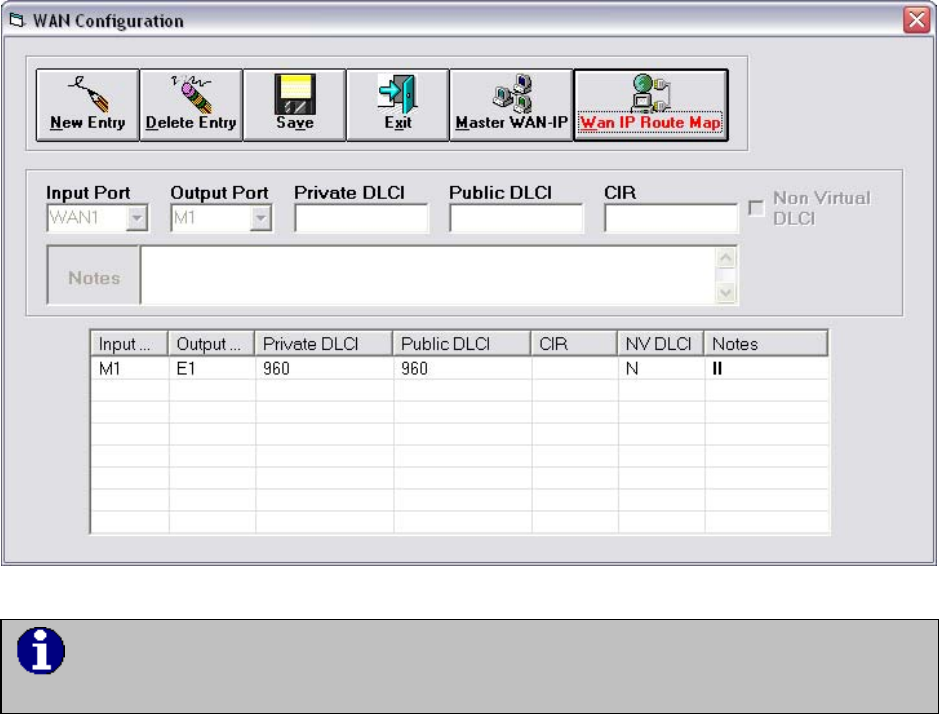
WAN Configuration
The following table shows the WAN Configuration associated with this sample configuration.
DLCI’s 900-989 are used for Microband VoIP when a WAN configuration entry
includes the E1 port
When DLCI’s within the range of 900 through 989 are specified in the Magnum Router,
referencing an output port of E1, the Magnum Router will automatically encapsulate any traffic
on the referenced input port (such as M1). However, if any of the DLCI’s from 900 to 989 are
used to connect one WAN port to another (such as WAN1 to M1), the Magnum Router will treat
that connection just like any other PVC connection.
Also note that when using the Microband VoIP features, the CIR should be set the same as the
clock speed on the M1 port. The default clock speed on M1 is 128K.
Master WAN IP Address
When configuring the Magnum Routers for Microband VoIP, there is no need to assign a serial
IP address in the Master WAN IP address table. The actual routing of any traffic is done
through the Ethernet (E1 port).