
User`s guide



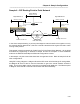
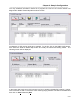


Table Of Contents
- Introduction
- Magnum Router Features
- Pre-Installation
- Installing the Hardware
- Magnum Router Manager Installation
- Logging Onto a Magnum Router
- Magnum Router GUI Manager
- Magnum Router Manager Main Screen
- Toolbar Buttons
- New Config Button
- Port Config Button
- WAN Config Button
- Other WAN Config Buttons
- Master WAN-IP Address
- WAN-IP Route Map
- Advanced Routing
- RIP Version 1 Routing
- Ethernet Config Button
- Micro-Band Voice Over IP
- Save Configuration
- Send Configuration
- Reboot the Magnum Router
- Menu Bar
- Configuration Menu (ALT-C)
- Settings Menu (ALT-S)
- System Menu (ALT-Y)
- Statistics Menu (ALT-T)
- Help Menu Item (ALT-H)
- Exit Menu Item (ALT-X)
- Toolbar Buttons
- Magnum Router Manager Main Screen
- Magnum Router Specialized Functions
- Sample Configurations
- Magnum Router Troubleshooting
- Magnum Router Cable Specifications
- Marathon Port Configuration
- Configuration Worksheets

Chapter 9: Sample Configurations
___________________________________________________________________
9-37
Magnum B (Remote)
Microband VoIP Configuration
In order to successfully configure MVoIP, you will need two IP addresses on the same subnet:
one is for the Ethernet (E1) interface and one is for MVoIP driver (also referred to as the
“source” address). In this example, the IP addresses to be used are as follows:
Magnum A: (Host)
E1 IP address: 66.67.68.250 / 24
MVoIP address: 66.67.68.251 / 24
Magnum B:
E1 IP address: 172.16.1.250 / 24
MVoIP address: 172.16.1.251 / 24
Although the Magnum A IP addresses are from the public Internet, MVoIP can also run over
private networks behind a firewall, thru a VPN Tunnel and even wireless systems. In all cases,
it is a requirement that 2 IP address of the same subnet be supplied.
The following windows illustrate the MVoIP Configuration associated with this sample
configuration: