
User`s guide



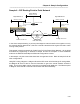
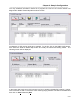


Table Of Contents
- Introduction
- Magnum Router Features
- Pre-Installation
- Installing the Hardware
- Magnum Router Manager Installation
- Logging Onto a Magnum Router
- Magnum Router GUI Manager
- Magnum Router Manager Main Screen
- Toolbar Buttons
- New Config Button
- Port Config Button
- WAN Config Button
- Other WAN Config Buttons
- Master WAN-IP Address
- WAN-IP Route Map
- Advanced Routing
- RIP Version 1 Routing
- Ethernet Config Button
- Micro-Band Voice Over IP
- Save Configuration
- Send Configuration
- Reboot the Magnum Router
- Menu Bar
- Configuration Menu (ALT-C)
- Settings Menu (ALT-S)
- System Menu (ALT-Y)
- Statistics Menu (ALT-T)
- Help Menu Item (ALT-H)
- Exit Menu Item (ALT-X)
- Toolbar Buttons
- Magnum Router Manager Main Screen
- Magnum Router Specialized Functions
- Sample Configurations
- Magnum Router Troubleshooting
- Magnum Router Cable Specifications
- Marathon Port Configuration
- Configuration Worksheets

Chapter 9: Sample Configurations
___________________________________________________________________
9-40
Sample 6 – RIP Routing Point to Point Network
IP Address: 192.168.1.2/24
IP Address: 192.168.1.1/24
IP Address: 10.1.100.250/24
CSU/DSU
Magnum/Marathon A
Ethernet port
Network: 10.1.100.0/24
CSU/DSU
Magnum/Marathon B
Ethernet port
Network: 172.16.1.0/24
IP Address: 172.16.1.250/24
Public Frame Relay
DLCI 16
PVC
WAN
Network
192.168.1.0/24
DLCI 17
RIP
Router
Remote Network
Network: 10.1.10.0/24
IP Address: 10.1.10.250/24
IP Address: 10.1.100.200/24
In the above sample drawing, a point-to-point Magnum network needs to tie together not only
the networks directly attached to it, but also a remote network that has a generic brand-x router
running a RIP protocol.
This sample is built from sample #2, Public Point-To-Point Frame Relay Network. All the WAN
and Ethernet programming is identical to sample #2 with the exception of some additional
entries in the WAN IP Route Map and Ethernet Configuration screens.
In this sample, only the screens that have been changed are shown. Refer to Sample #2 for all
other configurations.
Using RIP routing, Magnum A, Magnum B and the RIP router will all exchange IP routing tables,
but Magnum B won’t be able to use the information to get to the remote network across the
WAN. This is where static routing is required on the Magnum B WAN side. The Ethernet ports
of Magnum A and the RIP router will communicate and route seamlessly.