
User`s guide
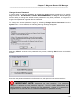
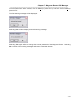
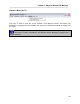
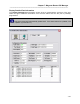
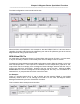
Table Of Contents
- Introduction
- Magnum Router Features
- Pre-Installation
- Installing the Hardware
- Magnum Router Manager Installation
- Logging Onto a Magnum Router
- Magnum Router GUI Manager
- Magnum Router Manager Main Screen
- Toolbar Buttons
- New Config Button
- Port Config Button
- WAN Config Button
- Other WAN Config Buttons
- Master WAN-IP Address
- WAN-IP Route Map
- Advanced Routing
- RIP Version 1 Routing
- Ethernet Config Button
- Micro-Band Voice Over IP
- Save Configuration
- Send Configuration
- Reboot the Magnum Router
- Menu Bar
- Configuration Menu (ALT-C)
- Settings Menu (ALT-S)
- System Menu (ALT-Y)
- Statistics Menu (ALT-T)
- Help Menu Item (ALT-H)
- Exit Menu Item (ALT-X)
- Toolbar Buttons
- Magnum Router Manager Main Screen
- Magnum Router Specialized Functions
- Sample Configurations
- Magnum Router Troubleshooting
- Magnum Router Cable Specifications
- Marathon Port Configuration
- Configuration Worksheets

Chapter 7: Magnum Router GUI Manager
___________________________________________________________________
7-50
Configuration Information
This section of the screen shows the physical port configuration along with the physical port
activity (such as transmitted and received bytes). It does not show specific DLCI information,
just physical port information.
DLCI State Information
As seen in the above screen, the Detailed Port Information screen reports DLCI’s that have
been either programmed or reported on the port specified in the Port dropdown box. The
possible states for a DLCI are:
Configured, Reported and Active:
The DLCI is up and operational
Configured, NOT Reported and Active:
The DLCI has been configured, but is currently down
Configured, NOT Reported and NOT Active:
The DLCI has not been configured into the Magnum Router, and is waiting for a
connection.
In cases where the Magnum Router port has been configured to work as a frame relay network
port (supplies all required frame relay information), then all DLCI’s for that port will show
Configured, Reported and Active. This DOES NOT mean that the DLCI is passing data. It
just means that the DLCI is being sent out the selected port.
Display MVoIP Mapping
The Display MVoIP Mapping function in the Statistics menu shows what has been programmed
or learned in the MVoIP connection.
Below is an example of what the screen would look like from a remote
And here is a sample of the same screen from a host.