
Specification Sheet

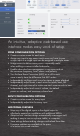




An intuitive, adaptive web-based user
interface makes easy work of setup.
ZONE CONFIGURATION OPTIONS
• Create a custom name for each zone
• Assign any input to any zone—each zone can have its own
unique input or a single input can be assigned to multiple zones
• Bridge zones to deliver more power—especially useful
when adding a custom-installed subwoofer
• Enable subwoofer bass management in any zone and set
the crossover frequency, level, phase, and polarity
• Turn Anthem Room Correction (ARC) on or off in each
zone to easily hear the difference that ARC makes
• Independently configure each zone for stereo or mono playback
• Independently adjust levels in each zone for treble, bass, left-
channel, and right-channel to make sure each room sounds its best
• Independently adjust each zone’s volume, the default
power on volume, and maximum volume level
INPUT CONFIGURATION OPTIONS
• Create a custom name for every input
• Independently adjust trim for every input
ADDITIONAL FEATURES
• Map any of the digital inputs to the digital output to
effortlessly expand an installation with additional MDAs
• Adaptive user interface design automatically rearranges itself,
making it easy to use on a phone, tablet, or computer
• Save settings before making changes and reload them later
• Firmware updates are available at the press
of a button via a web-interface