
User`s manual




MI
MIMI
MI-
--
-2100 Operator
2100 Operator2100 Operator
2100 Operator Manual
Manual Manual
Manual
MI-2100 Operator Manual
-11-
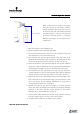
When a user wants to change a 3D system
into a 2D system, the user has to lower the
circular polarized rotary filter part so as not
to block the left and right image projected
from the projector. To do this, the user has
to secure a minimum space (1,112.60mm)
between the bottom of the Projector lens
and the floor.
1. Move the system to the installation site.
2. Select a flat place and clear away obstacles.
3. The circular polarized rotary filter has to be installed closely and
face toward the front of the Projector lens.
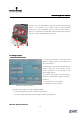
4. The Projector lens and Circular polarized rotary filter have to be
paralleled both horizontally and vertically by adjusting both screws
on the filter driving part and the direction of body. (Picture 3)
5. Check the location of the projected image on the Circular polarized
rotary filter. (Caution: White light sources generate hot temperature,
hot temperature damages to the circular polarized rotary filter.)
6. The projected left and right image from the projector should be
exactly matched on the circular polarized rotary filter by adjusting
both the height of the filter and location of the body. (Picture 1)
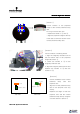
7. Align the joint of the circular polarized rotary filter at the edge of the
side of left bottom of the projected image from the projector, locate
and fix the sensor at the imaginary extension line of the joint of
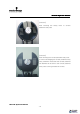
circular polarized rotary filter. (Picture 2)
8. Parallel the projector lens with the surface of circular polarized
rotary filter both horizontally and vertically by adjusting both the
direction of the body and the screws located on the circular
polarized rotary filter driving part. (Picture 3)
9. Connect Sync cable to GPIO port (32 pin) of the projector, connect
the Sync cable to Sync In (9 pin) on the Control panel.
10. Plug the power cable into the power source (220V).
1112.60mm (MIN)