
User`s manual




MI
MIMI
MI-
--
-2100 Operator
2100 Operator2100 Operator
2100 Operator Manual
Manual Manual
Manual
MI-2100 Operator Manual
-12-
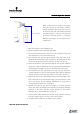
[Picture 1]
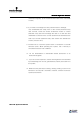
Correct location of the projected
image on the circular polarized rotary
filter
Do not go over the filter line.
- equalize the width of ① and ②.
- Align the projected image at the top
of the filter to reach the surface of the
circular polarized rotary filter.
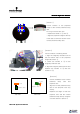
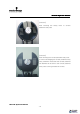
[Picture 2]
Correct location of Rotating Sensor
1. Align the imaginary extension line at
the left bottom side of the projected
image like picture ①.
2. Check the number of ② on the
imaginary extension line.
3. Align the imaginary extension line and
equalize the number of ② with the
number of ③.
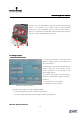
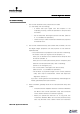
[Picture 3]
Correct installation of the circular
polarized rotary filter and
projector lens
Align the circular polarized rotary
filter to the projector lens very
closely.
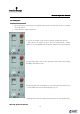
Equalize the angle of both the
projector lens and the circular
polarized rotary filter by using the
A screws shown in picture 4.
①
②
③
Filter
Projector Lens
Top View
Filter
Projector Lens
Side View
①
②
③