
User`s manual




MI
MIMI
MI-
--
-2100 Operator
2100 Operator2100 Operator
2100 Operator Manual
Manual Manual
Manual
MI-2100 Operator Manual
-13-
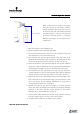
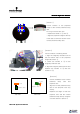
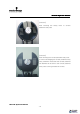
[Picture 4] If it is impossible to align the circular polarized rotary
filter to the projector very closely owing to environmental
restrictions of the installation site, use the B screws shown in
picture 4. Loosen the B screws and move the filter to the projector
lens very closely and tighten the B screws.
3.
3.3.
3.2
2 2
2 Setting Projector
Setting ProjectorSetting Projector
Setting Projector
1. Connect HD projector to 3D Server and
operate. (Please refer to the manual for
more information.)
2. Upload the film, finish all the steps and be
ready to push the “PLAY” button on the
Server. (Projector is in the process of 3D
Sync Signal Output)
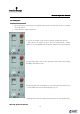
3. Set up the 3D mode on the HD projector.
(Projector manufacturer supplies manual -
Picture 5)
** Frame rate: 6:2 (144 frames)
** Frame rate: 4:2 (96 frames)
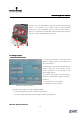
- Christie CP 2000 [Picture 5]-
[Picture 5] HD Projector 3D Set-up Mode Display
- Dark Time depends on type of Projector and Server.
- 3D Sync Polarity depends on the settings of server and projector.
B
BB
B
A
AA
A