
User`s manual




MI
MIMI
MI-
--
-2100 Operator
2100 Operator2100 Operator
2100 Operator Manual
Manual Manual
Manual
MI-2100 Operator Manual
-19-
4.
4.4.
4.3
3 3
3 Trouble
TroubleTrouble
Trouble-
--
-sh
shsh
shooting
ootingooting
ooting
1. The Circular polarized rotary filter does not rotate
(i.e. the Ready LED is flickering)
- It seems that Sync signal from the Projector is not
outputting correctly. Check the operation of Projector and
3D Server.
- Turn off the power. Start again from the first step. (Refer to
P. 10, installation & operation.)
- Check the Sync Cable connection between the projector
and the MI-2100.
2. The Circular Polarized Rotary filter rotates well, however, the Left
and Right images projected from the projector do not seem be
separated well.
- This phenomenon may happens in the process of detecting
the output of the Sync signal from the projector, or
when you run the MI-2100 in advance before Projector and
3D Server operates, or
when you turn on the system directly after a compulsory end
while the Circular polarized rotary filter is operating.
(Power off or Emergency off)
- Turn off the power. Start again from the first step.
(Refer to the P. 10, installation & operation.)
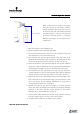
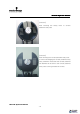
- The location of projected image on the circular polarized
rotary filter may be mismatched. Check and adjust the
alignment. (Picture 1)
If you don’t use 3D glasses recommended by masterImage, we
cannot guarantee perfect performance.
3. Noise increases gradually while the circular polarized rotary filter
rotates.
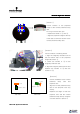
- This phenomenon happens when the connection between
the Motor and Circular polarized rotary filter becomes
loose. Please check the connection regularly.
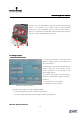
- While you operate the MI-2100 for a long time, the
connection between Motor and Circular polarized rotary
filter may become loose. Please check the connection