
manual

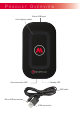

LED indicator Product state
Red Standby LED
Green (ashing) Communication
F i r s t s t e P s
Step 3
Step 2
Step 1
In case the LED indicators does not work
right try to plug and unplug the adapter
from the power socket.
Now put your wireless charging able
device in the middel of the PAD. After a
short sound it starts charging automati-
cally. To see the battery state check your
display.
After charging your device pleas remove
it from the PAD.
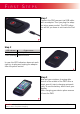
Connect the PAD compact via USB cable
with an adapter. Then you plug the adap-
ter into a power socket. The LED indica-
tor will let you know in wich sate the Pad
is.
1
2
3
Attention : As proof that the Pad communicates with the receiver, the communication LED still
ashes after complete charging.