
User manual

User Manual CM10
Page 5 of 14
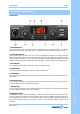
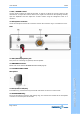
9. OFF / VOLUME Control
Use this knob to switch the radio ON and OFF, as well as to adjust the receiver volume to the
desired level. To adjust the receiver volume (if no signals are received on the operating channel),
open the SQUELCH and then adjust the receiver volume using the background noise as a
reference.
10. Microphone Connector
Insert the microphone lead to this connector and turn the connector ring in a clockwise to lock it.
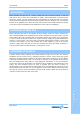
Rear
11. EXT (External) Speaker Jack
This jack is for connecting an (optional) external speaker.
12. ANTENNA Connector
Please refer to the section ANTENNA INSTALLATION (page 6).
13. 13.2VDC POWER CORD
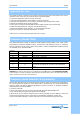
Microphone
C
C
C
o
o
o
n
n
n
t
t
t
r
r
r
o
o
o
l
l
l
&
&
&
O
O
O
p
p
p
e
e
e
r
r
r
a
a
a
t
t
t
i
i
i
o
o
n
n
14. PTT (Push-to-Talk) Key
Transmitter key, press the PTT key to transmit and release to return to receive mode.
15. MICROPHONE Plug
The 4-pin microphone connector (with locking ring), this connects the handset to the microphone
connector on the front panel of the radio.
on