
Specifications






64 MDS 4790/9790 Series I/O Guide MDS 05-3438A01, Rev. E
GROUP 1—MAIN SCREENS
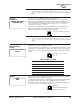
Start-up Screen
When the radio is first powered on, or after a period of time has elapsed after the
last button press, the front panel display shows the start-up screen. The start-up
screen displays the product model number, as well as the owner’s name and
message. (Typically, customers use the owner name and message fields to display
the system and site name.)
The screen dims after a period of time has elapsed without any activity; brightness
can be restored by pressing any button.
To change what is displayed on this screen, see “Set Owner Name” on Page 72
and “Set Owner Message” on Page 72.
Press ENTER, or the up or down arrow button, to display the Menu Directory screen.
The screen dims after a period of time has elapsed without any activity; brightness
can be restored by pressing any button.
To change what is displayed on this screen, see “Set Owner Name” on Page 72
and “Set Owner Message” on Page 72.
Press ENTER, or the up or down arrow button, to display the Menu Directory
screen.
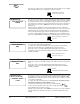
Menu Directory This screen is used to access three screen display cycles: Configuration,
Diagnostics, and Event Log. The selection arrow (
->) points to the currently
selected menu.
Press the up/down arrow buttons to move the arrow to the desired menu, then
press the right/left arrow buttons to display each of that menu’s screens in
succession.
GROUP 2—CONFIGURATION
Access Level
This screen is used to set the front panel display to configuration mode by selecting
a level of access. There are two levels:
NONE—This is the default setting upon power-up (“safe” mode). All radio set-
tings can be viewed, the access level can be changed, and the front panel dis-
play brightness and contrast can be changed. All other settings are for display
only, and cannot be changed.
USER—Changes can be made to any radio parameter (“configuration” mode).
To select the USER access level, press ENTER, press the down arrow button to
display the word “User,” then press ENTER again to make the change.
The radio returns automatically to safe mode (access level: NONE) after a period
of time has elapsed without a button press, or if the radio is powered off and then
on.
Transmit
Frequency
This screen is used to display or set the transmitter frequency.
Normally, the radio will be shipped programmed with the customer-specified
frequency. If the operating frequency was not specified when the radio was
ordered, the TX frequency is set to the center of the radio’s operating band. The
range of frequencies for standard models are given Section 10.1, Technical
Specifications, beginning on Page 93.
To change the current frequency, press ENTER, then use the left/right arrow
buttons to select a digit. Then use the up/down arrow buttons to increase or
decrease the number. Press ENTER to make the change.
MM
MM
DD
DD
SS
SS
44
44
77
77
99
99
00
00
MM
MM
AA
AA
SS
SS
RR
RR
aa
aa
dd
dd
ii
ii
oo
oo
OO
OO
WW
WW
NN
NN
EE
EE
RR
RR
SS
SS
NN
NN
AA
AA
MM
MM
EE
EE
OO
OO
WW
WW
NN
NN
EE
EE
RR
RR
SS
SS
MM
MM
EE
EE
SS
SS
SS
SS
AA
AA
GG
GG
EE
EE
MM
MM
DD
DD
SS
SS
44
44
77
77
99
99
00
00
AA
AA
MM
MM
AA
AA
SS
SS
RR
RR
aa
aa
dd
dd
ii
ii
oo
oo
--
--
>>
>>
CC
CC
oo
oo
nn
nn
ff
ff
ii
ii
gg
gg
uu
uu
rr
rr
aa
aa
tt
tt
ii
ii
oo
oo
nn
nn
DD
DD
ii
ii
aa
aa
gg
gg
nn
nn
oo
oo
ss
ss
tt
tt
ii
ii
cc
cc
ss
ss
EE
EE
vv
vv
ee
ee
nn
nn
tt
tt
LL
LL
oo
oo
gg
gg
SS
SS
ee
ee
tt
tt
AA
AA
cc
cc
cc
cc
ee
ee
ss
ss
ss
ss
LL
LL
ee
ee
vv
vv
ee
ee
ll
ll
UU
UU
ss
ss
ee
ee
rr
rr
TT
TT
rr
rr
aa
aa
nn
nn
ss
ss
mm
mm
ii
ii
tt
tt
FF
FF
rr
rr
ee
ee
qq
qq
uu
uu
ee
ee
nn
nn
cc
cc
yy
yy
44
44
00
00
00
00
..
..
00
00
00
00
00
00
00
00
00
00
MM
MM
HH
HH
zz
zz
TX [xxxx] command, Page 54