
Specifications






66 MDS 4790/9790 Series I/O Guide MDS 05-3438A01, Rev. E
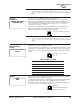
Baud Rate/Format This screen is used to set or display the communication attributes for the DATA
INTERFACE port. For a description of the communication attributes, see BAUD
[xxxxx abc] command
, Page 38.
To change the baud rate, press ENTER, then press the left arrow button to move
the underscore under the baud rate. Then use the up/down arrow buttons to select
a new baud rate.
To change the data format, press ENTER, then press the right arrow button one or
more times to move the underscore (_) under the character to change. Then use
the up/down arrow buttons to change the character. Repeat for the other
characters in the data format if necessary. Press ENTER to make the change.
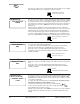
Emphasis This screen is used to enable or disable pre-emphasis and de-emphasis on the
analog input and output signals.
Pre-emphasis is a function used in older analog radios where the modulating signal
is increased (at the transmitter) at the higher frequencies to increase system
performance. De-emphasis compensates (at the receiver) for a signal that has had
pre-emphasis applied.
To enable or disable pre-emphasis and de-emphasis, press ENTER, then use the
up/down arrow buttons to display ENABLED or DISABLED. Press ENTER to make
the change.
Clear-to-Send
Delay
This screen is used to set or display the Clear-to-Send Delay. This is the amount of
time to wait after RTS is asserted by the host computer on the data port before
asserting the CTS line. When the delay is 0, data will be sent out the data port
without imposing a keying delay.
To change the delay, press ENTER, then use the left/right arrow buttons to select
the digit to change. Then use the up/down arrow buttons to increase or decrease
the digit. Repeat for the other digits if necessary. Press ENTER again to make the
change.
Push-to-Talk Delay This screen is used to set or display the Push-to-Talk Delay. This is the amount of
time to wait after RTS is asserted by the host computer before the radio is keyed
and begins to transmit. When the delay is 0, the radio will key up immediately
following the keying signal.
To change the delay, press ENTER, then use the left/right arrow buttons to select
the digit to change. Then use the up/down arrow buttons to increase or decrease
the digit. Repeat for the other digits if necessary. Press ENTER again to make the
change.
BB
BB
aa
aa
uu
uu
dd
dd
rr
rr
aa
aa
tt
tt
ee
ee
//
//
FF
FF
oo
oo
rr
rr
mm
mm
aa
aa
tt
tt
99
99
66
66
00
00
00
00
88
88
NN
NN
11
11
BAUD [xxxxx abc] command,
Page 38
EE
EE
mm
mm
pp
pp
hh
hh
aa
aa
ss
ss
ii
ii
ss
ss
ee
ee
nn
nn
aa
aa
bb
bb
ll
ll
ee
ee
dd
dd
EMP [ON/OFF] command,
Page 42
CC
CC
ll
ll
ee
ee
aa
aa
rr
rr
tt
tt
oo
oo
SS
SS
ee
ee
nn
nn
dd
dd
DD
DD
ee
ee
ll
ll
aa
aa
yy
yy
00
00
mm
mm
ii
ii
ll
ll
ll
ll
ii
ii
ss
ss
ee
ee
cc
cc
oo
oo
nn
nn
dd
dd
ss
ss
CTS [0-255] command,
Page 40
PP
PP
uu
uu
ss
ss
hh
hh
tt
tt
oo
oo
TT
TT
aa
aa
ll
ll
kk
kk
DD
DD
ee
ee
ll
ll
aa
aa
yy
yy
00
00
mm
mm
ii
ii
ll
ll
ll
ll
ii
ii
ss
ss
ee
ee
cc
cc
oo
oo
nn
nn
dd
dd
ss
ss
PTT [0-255] command,
Page 47