
User`s guide




Chapter 2 Using Your Presto! PVR
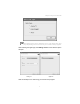
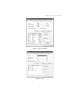
The image above is for reference only. This dialog box may
vary depending on the version of your Presto! PVR program.
After selecting the signal type, the Settings Wizard for the selected option
will open.
Analog TV Digital TV
Click the desktop icon to start using your Presto! PVR program.
4