
User`s manual


10
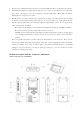
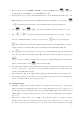
1. FOLDER 1 or FOLDER 2: You need to enter the FOLDER 1 to play the files/tracks previously recorded with
the PDR-1. Enter the FOLDER 2 instead to play files downloaded/transferred from a computer. To change
between the two folders, you need to press + to interchange FOLDER 1 and FOLDER 2.(○1 )
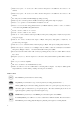
2. Playback from flash memory or SD card memory : Select the files you want to playback form internal flash
memory or SD card memory (further explained in the previous chapter Recording) (○
2
)
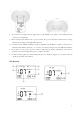
3. Select the Group and track you want to playback: By pressing + or to select group
number in the range from range 1 to 9.(○
3
) And select the track to playback by press or button
in the range from 1-99 (○
4
). The recording format and sample rate of the track you select will show up on the
LCD display.(○
5
)
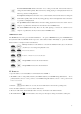
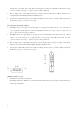
4. Press to start to playback, the LCD display will show “”. Press the button during playing to pause,
the LCD display will show “”. (○
7
) Press the same button again to continue playing.
5. Forward and rewind during playback: Hold on during playback to rewind the playing. Hold down
to forward the playing. The time display will move quickly according to the position. Release the
button to go back to normal playback.
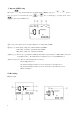
6. Repeat and Repeat All: Enter the MENU mode, and set up repeat mode. When select REP, the track will be
repeated always. If you select REP All, the device will repeat all the tracks. Please note that the REP All
function only works in FOLDER 2 mode. The LCD will show REP mode on the LCD display. (○
6
)
7. A-B loop : press button during playback to define a loop start point (A point), then press the button
again to indicate the loop end point (B point). The music will then play from A to B again and again loop until
you press the button again to stop.(○
8
)
8. The device allows you to adjust the volume level of earphone or built-in speaker by press or
during playback. The adjusting level range is from 00 to 20.
VIII. Delete tracks
You can delete the recording files via computer or by the device itself. The following progress is the way to delete
the files with the device: Select the track you want to delete, press + , the LCD will show “dEL”,
then you need to press again, the machine will start to delete the track. When the LCD finish showing
“dELETE” and the clock return to 00:00:00, means the track is empty and are available for a new recording.