
User`s manual


11
IX. Transfer to and from your computer
The device can be connected with computer, to copy and store your recording files on your computer (to backup
your data), or download music to play at this unit.
When you connect USB port with your computer, the computer will detect the PDR-1 as two removable disks (the
first disk represents the build-in flash memory; the second disk represents the SD card memory), and you will find
folders of Group 1 – 9 in each removable disks. The music you have downloaded from the computer to the device
will be accessible in FOLDER 2, and the track number depends on the sequence in which the files are transferred.
This means that the track number in FOLDER 2 is not fixed and can be changed at any time if a track is deleted or
added.
If you want the files get a fixed track number, you can store the music in FOLDER 1. To do this, you simply need
to change the filenames according to the following sequence:
a) If you want to download files to FOLDER 1 to be with fixed track number, and store to the built -in
flash memory, change the file name to M_INT_xx (where xx is the track number you want it to be.)
b) If you want to download files to FOLDER 1 to be with fixed track number, and store to the SD
memory card, change the file name to M_EXT_xx (where xx is the track number you want it to be.)
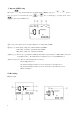
PS1. The device can work with USB adaptor, when connecting with computer, LCD will show “ USB” so you
can press once, the machine will enter the operating mode, then you can operate the device with
the power of computer. You will leave the operating mode when you press over 2 seconds.
PS2. The device can work with USB DC 5V adaptor, while LCD showed “ USB” so you can press once,
the machine will enter the operating mode, then you can operate the device with the power of DC 5V.
You will leave the operating mode when you press over 2 seconds.