
User`s manual
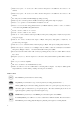

4
○
1
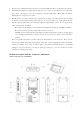
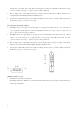
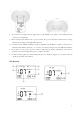
Built-in microphone “L “channel: an omni condenser microphone is installed into the device as “L”
channel.
○
2
Built-in microphone “R” channel: an omni condenser microphone is installed into the device as “R”
channel.
○
3
Recording indicator LED: the LED will light up during recording.
○
4
Built-in speaker: a monitor speaker is installed, it will stop working when earphone is plug in.
○
5
Battery cover: open the cover and install two AA batteries to work.
○
6
Battery select switch: when using primary batteries (or Alkaline batteries), switch to “1.5V”; or switch to
“1.2V” when using Ni-MH rechargeable batteries.
○
7
Volume controller of Audio-in “L” channel
○
8
Volume controller of Audio-in “R” channel
○
9
Audio-in “L” channel: it allows audio input of M(ext. microphone), G(E. guitar) or L(Line-in). It provides
1.5V power supply.
○
10
Audio-in “R” channel: it allows audio inputs of M(ext. microphone), G(E. guitar) or L(Line-in). It
provides 1.5V power supply.
○
11
Audio-in selector: to select three kinds of audio input types, M(ext. microphone) / G(E. guitar) / L(line-in)
○
12
Built-in microphone sensitivity selector: H(high) / L(low) / OFF: to select the sensitivity level of built -in
microphones, H(high) or L(low). Or switch off the built-in microphone (OFF).
○
13
Key hold switch ON / OFF: switch “ON” to hold (stop running) the key control, or switch “OFF” to release
key control.
○
14
Earphone jack (stereo): when an earphone is connected to this jack, the built -in speaker will be switched
off.
○
15
Line out port: connect to amplifier.
○
16
SD card socket: allow to use install SD memory cards.
○
17
USB socket / DC Power in: Use a USB cable to connecting with a computer. You may use USB type DC
adaptor (DC 5V) to work from this port (DC power adaptor is not include).
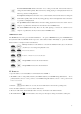
Button control
Record button: press the button to start recording
Stop button: press the button to stop or cancel operations (recording, playback, delete …)
A-B loop button: press the button during playback to define a loop start point (A point), then press
the button again to indicate the loop end point (B point). The music will then play from A to B
again and again loop until you press the button again to stop.
MENU button: press the key to enter MENU, press the button again to leave MENU.
Power/Play button: press still for 2 seconds to switch ON or OFF the machine; Press the button to
PLAYBACK; press it during playback will pause playback, push it again to continue playback.