
User`s manual

7
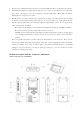
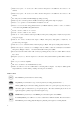
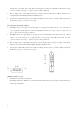
1. The device allows you to record ONLY in FOLDER 1. To change to FOLDER 1, press + , when
the LCD display shows FOLDER 1, you are in FOLDER 1 mode. (○1 )
2. The device allows you to record into the internal flash memory or into an installed SD card memory (○
2
). The
PDR-1will change to the SD card memory automatically when SD card is installed. Or you can press
+ to interchange between the memory of the internal flash memory (F) and the SD card (C).
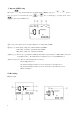
3. Press + or + to select the group number in the range from range 1 to 9. (○
3
)
4. Press or to select the recording track in the range from 01 to 99 to record (○
4
). You may
select any of a blank track number you want to record to, then press button to record; Or just press
button directly, the device will select a blank track follows the last recorded track number to record (for
example, if the last recorded track number is 05, the automatically selected track number will be 06).
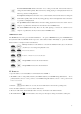
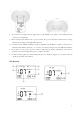
5. Press button to start recording, the Recording indicator LED will light up still, the LCD display will
show “●”, and the time clock will start running (○5 ), which means that the recording is in progress. Press
to pause record during recording, the Recording indicator LED will start flash, press the same button
again to continue recording. Press button to finish recording.
6. The volume indicator will show on the LCD during recording (○
6
), you can adjust input volume by the Volume
controller of Audio-in (○
8
or ○
9
). Please do not set to the highest volume level on recording, otherwise, the
recording sound quality will be distorted.
7. When you finish recording, the recording format and sample rate of this track will show up on the LCD. (○
7
)
8. For long time recording, you can switch Key hold switch (○
14
) to ON position to hold (stop running) the key
control. And switch to OFF position to release key control.
Record from microphones
1. The PDR-1 is equipped with two built-in microphones (omni directional condenser type). You may adjust
high/low sensitivity level of built-in microphones for recording from the Built-in microphone sensitivity selector
(○
13
). The high sensitivity level of built-in microphone is at -45dB(at 1KHz), while the low sensitivity level is at
-35dB(at 1KHz). You may also adjust the Volume controller of Audio-in to make slight volume adjustment.
(○
8
or ○
9
)
2. There are two extension Audio-in jacks of PDR-1 (○
10
& ○
11
). They allow you to plug two extension
microphones into the jacks for recording, please select to “M” position of the Audio-in selector (○
12
). The
two Audio-in jacks both provide DC 1.5V power; you may use either condenser microphones or dynamic