
User manual





InstallationRev 1.0
Mellanox Technologies
42
2. Configure a serial terminal program (for example, HyperTerminal, minicom, or Tera Term)
on your host PC with the settings described in
Table 13.
3. Login (from a serial terminal program) as admin and use admin as password. This starts the
Mellanox configuration wizard.
4. Go through the Mellanox configuration wizard. Table 14 shows an example of a wizard ses-
sion.
Make sure to connect to the Console RJ-45 port of the switch and not to the (Ether-
net) MGT port.
No remote IP connection is available at this stage.
Table 13 - Serial Terminal Program Configuration
Parameter Setting
Baud Rate 9600
Data bits 8
Stop bits 1
Parity None
Flow Control None
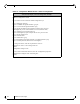
Table 14 - Configuration Wizard Session - DHCP (Sheet 1 of 2)Configuration (Example)
Wizard Session Display Comments
Mellanox configuration wizard
Do you want to use the wizard
for initial configuration? yes
You must perform this configuration the first time you
operate the switch or after resetting the switch. Type ‘y’
and then press <Enter>.
Step 1: Hostname? [switch] If you wish to accept the default hostname, then press
<Enter>. Otherwise, type a different hostname and press
<Enter>.