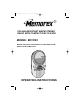
MC1003.QXD 3/3/03 9:56 AM Page 21 SPLASH-RESISTANT AM/FM STEREO RADIO WITH COMPACT DISC PLAYER MODEL: MC1003 BEFORE OPERATING THIS PRODUCT, PLEASE READ THESE INSTRUCTIONS COMPLETELY.
MC1003.QXD 3/3/03 9:56 AM Page 1 SAFETY PRECAUTIONS Thank you for purchasing the Memorex audio system. The serial number of your unit can be found on a label on the rear of the cabinet. We suggest that you record the serial number in the space provided below in case this information is ever needed at a future date. PLEASE KEEP ALL PACKAGING MATERIAL FOR AT LEAST 90 DAYS IN CASE YOU NEED TO RETURN THIS PRODUCT TO YOUR PLACE OF PURCHASE OR MEMOREX.
MC1003.QXD 3/3/03 9:56 AM Page 2 SAFETY PRECAUTIONS (CONTINUED) FCC WARNING: This equipment may generate or use radio frequency energy. Changes or modifications to this equipment may cause harmful interference unless the modifications are expressly approved in the instruction manual. The user could lose the authority to operate this equipment if an unauthorized change or modification is made. LASER SAFETY: This unit employs a laser.
MC1003.QXD 3/3/03 9:56 AM Page 3 SAFETY PRECAUTIONS (CONTINUED) • • • • • Do not open the CD compartment while the CD is rotating. Always keep the CD compartment closed when not in use. Keep all foreign objects out of the CD compartment. Place the unit on a stable surface. Avoid installing the unit in locations described below: • Places exposed to direct sunlight or close to heat radiating appliances such as electric heaters. • On top of other stereo equipment that radiates too much heat.
MC1003.QXD 3/3/03 9:56 AM Page 4 Dear Customer: Selecting fine audio equipment such as the unit you’ve just purchased is only the start of your musical enjoyment. Now it’s time to consider how you can maximize the fun and excitement your equipment offers. This manufacturer and the Electronic Industries Association’s Consumer Electronics Group want you to get the most out of your equipment by playing it at a safe level.
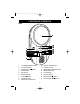
MC1003.QXD 3/3/03 9:56 AM Page 5 LOCATION OF CONTROLS MAIN ' ! " # $ % ! " # $ % & 1. 2. 3. 4. 5. 6. 7. 8. 9. VOLUME/POWER Control CD Track Display SKIP/Search Button MODE Button SET Button REPEAT Button STOP (■) Button Headphone Jack Mirror/CD Compartment 10. 11. 12. 13. 14. 15. 16. CD Door OPEN Button TUNING Control AM/FM Dial Scale and Pointer PROGRAM Button Clock Display Function Switch SKIP/Search Button 17.
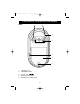
MC1003.QXD 3/3/03 9:56 AM Page 6 LOCATION OF CONTROLS (CONTINUED) REAR 1 2 3 4 5 1. 2. Hanging Cord Wall Mount Holes 3. 4. 5.
MC1003.QXD 3/3/03 9:56 AM Page 7 INSTALLATION SPLASH RESISTANT: DO NOT use this unit under direct water flow. This unit is splash resistant, meaning it can withstand small splashes of water. MOUNTING THE UNIT ON THE BASE To use this unit with the supplied base, simply slide the hole on the rear of the unit into the hook on the base and gently push it backwards so it snaps in place as shown in figure 1.
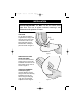
MC1003.QXD 3/3/03 9:56 AM Page 8 INSTALLATION (CONTINUED) INSTALLING ON A WALL 1 2 Put the Wall Adapter with suction cups on the wall. Pull the suction cup lever down and it will stick to the wall. 3 4 Place the Detachable Mounting Bracket onto the Wall Adapter. Connect the main unit to the Wall Adapter by inserting the holes on the base unit into the hooks on the Wall Adapter. REMOVAL To remove, reverse the above steps.
MC1003.QXD 3/3/03 9:56 AM Page 9 POWER SOURCES This CD player requires either eight (8) “C” cell batteries (not included) or a 9V AC adapter having a positive center. BATTERY INSTALLATION 1. Make sure the unit is not on the base. Open the battery compartment door by rotating the Battery knob clockwise, then lift the battery compartment off. 2. Insert eight (8) “C” cell batteries (not included) as shown in the illustration to the right. Alkaline batteries are recommended for the longest playing time. 3.
MC1003.QXD 3/3/03 9:56 AM Page 10 OPERATION FOGLESS MIRROR Before using, remove the thin film over the fogless mirror and discard. CLEANING THE MIRROR If the mirror, which is made of polycarbonate (plastic), becomes dirty or smudged with fingerprints, it may be cleaned with a wet soft cloth. Never use abrasive cloths or polishes as these will mar the finish of the mirror. TO PLAY THE RADIO 1 2 Rotate the VOLUME/POWER control ❶ clockwise until a click is heard to turn the unit on.
MC1003.QXD 3/3/03 9:56 AM Page 11 OPERATION (CONTINUED) TO PLAY A CD 1 2 Insert a CD as described on the previous page and press the PLAY/PAUSE ( ) button to start playback. TO PAUSE PLAYBACK, press the PLAY/PAUSE ( ) button again; PLAY will blink in the display. Press the PLAY/PAUSE ( ) button again to resume playback. Rotate the VOLUME/POWER control ❶ clockwise until a click is heard to turn the unit on. Turn the Function switch ❷ to the CD position.
MC1003.QXD 3/3/03 9:56 AM Page 12 OPERATION (CONTINUED) TO REPEATEDLY PLAY BACK ONE TRACK 2 " 1 ! Turn the unit on and turn the Function switch ❶ to the CD position. Press the REPEAT button ❷ once; RPT will blink in the display. Select a track using the SKIP/Search ❸ or ❹ buttons. ! Press the PLAY/PAUSE ( ) button ❶. The unit will then play the same track over and over until the STOP (■) button ❷ is pressed. Adjust the VOLUME/ POWER control ❸ as desired.
MC1003.QXD 3/3/03 9:56 AM Page 13 OPERATION (CONTINUED) TO PROGRAM THE MEMORY (UP TO 20 TRACKS) 2 ! 1 Press the PROGRAM button ❶, “PRG” and “01” will blink in the display. Press the SKIP/Search ❷ or ❸ button repeatedly to select the first desired track to program. Press the PROGRAM button ❶ to memorize the track. 3 4 " ! Press the SKIP/Search ❶ or ❷ button repeatedly to select the second desired track to program. Press the PROGRAM button ❸ to memorize the track.
MC1003.QXD 3/3/03 9:56 AM Page 14 OPERATION (CONTINUED) TO SET OR RESET THE ACTUAL TIME 1 2 Press the MODE button four times; the month will appear in the display. Repeatedly press the SET button ❶ to set the current month, then press the MODE button ❷ to confirm; the day will appear in the display. 3 4 Repeatedly press the SET button ❶ to set the current day, then press the MODE button ❷ to confirm; the current hour will appear in the display.
MC1003.QXD 3/3/03 9:56 AM Page 15 OPERATION (CONTINUED) TO SET OR RESET THE ALARM TIME Please note that the alarm will be a beeping sound for 30 seconds. The alarm cannot be set to turn on to the radio. 1 2 Press the MODE button ❶ twice; the alarm time hour will blink. Repeatedly press the SET button ❷ to set the alarm hour, then press the MODE button ❶ to confirm; the alarm minute will appear in the display.
MC1003.QXD 3/3/03 9:56 AM Page 16 IMPORTANT SAFETY INSTRUCTIONS TO SHUT OFF THE ALARM CHECKING TIMES/DATE 1 1 To turn off the alarm while it is sounding, press the SET button. The alarm will stop and be set for the next day. Press the SET button once while in the actual time mode to check the alarm time, twice to check the date and three times to check the seconds. While checking the alarm or date, the unit will revert back to the actual time mode after three seconds.
MC1003.QXD 3/3/03 9:56 AM Page 17 TROUBLESHOOTING GUIDE If you experience a problem with this unit, check the chart below before calling for service. SYMPTOM Unit will not turn on. Disc will not play. Erratic CD playback. No sound. Noise or sound distorted on radio. Alarm does not sound. CAUSE Weak or dead batteries. Wrong adapter being used AC adapter not connected. CD compartment not closed. Disc inserted incorrectly. Dirty or defective disc. Moisture condensation on disc.
MC1003.QXD 3/3/03 9:56 AM Page 18 CARE AND MAINTENANCE Caring for Compact Discs • Treat the compact disc carefully. Handle the compact compact disc only by its edges. Never allow your fingers to come in contact with the shiny, unprinted side of the compact compact disc. • Do not attach adhesive tape, stickers, etc. to the compact disc label. • Clean the compact disc periodically with a soft, lint-free, dry cloth. Never use detergents or abrasive cleaners to clean the compact disc.
MC1003.QXD 3/3/03 9:56 AM Page 19 SPECIFICATIONS Frequency Range (FM) .......................................................87.5–108MHz Frequency Range (AM) .......................................................530–1720kHz Dimensions .............................................12” (H) x 6–1/2” (W) x 3-1/4” (D) Weight ..............................................................................................1.4Kg FOR ADDITIONAL SET-UP OR OPERATING ASSISTANCE, PLEASE VISIT OUR WEBSITE AT WWW.
MC1003.QXD 3/3/03 9:56 AM Page 20 Memcorp, Inc. Weston, FL Printed in Hong Kong Visit our website at www.memorexelectronics.