
Operation Manual



MI 2092 Power Harmonics Analyser Section III Operation manual
25
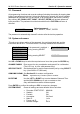
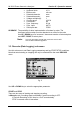
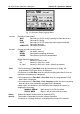
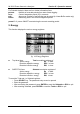
fig. 11: Harmonics Sub-menu
Use LEFT, RIGHT, UP and DOWN keys to select the required signal. Enable or disable
the signal for recording with the SELECT key.
Signals sub-menu Select per-phase and/or total 3j values.
Selecting a voltage signal U will also automatically enable logging of Voltage
Anomalies for that phase (if Voltage Anomaly recording mode is selected as
FIXED or VARIABLE).
Harmonics sub-menu The selected harmonics are valid for all the selected phases
(L
1
, L
2
, L
3
as shown at the top of the screen).
It is not possible to set different combinations for individual phases.
Selecting one or more harmonics will automatically select THD measurement.
Press ENTER to confirm the new settings or ESC to cancel.
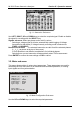
3.5. Meter sub-menu
This menu allows setting of various input parameters. These parameters are used for
calculating the true rms values of all measured and calculated quantities, for scaling
input signals and for synchronisation.
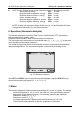
METER
Configuration
Irange(1V) : 1000A
Uinp.K.(*) : 1
sync.inpt. : auto
last calb.:
18.06.2001 09:18
connection : 4wire
sync.freq : 50 Hz
Unomin.(V) : 230.0 V
fig. 12: Meter Configuration Sub-menu
Use the UP and DOWN keys to select the required parameter.