
User guide

Radiance R1000 Premise Service Platform 7
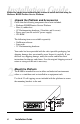
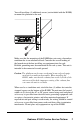
You will need four (4) additional screws (not included with the R1000)
to mount the platform in the rack.
FX
M
M
II
x
T
X
PWRFDMAN
RX
LK
LBK
DIS
RX
LK
LBK
DIS
100 BASE
2
Make sure that the mounting of the R1000 does not create a hazardous
condition due to an unbalanced load. Consider the overall loading of
the branch circuit before installing any equipment into the rack.
Reliable grounding must be maintained in the rack system. This unit is
intended to be connected to earth ground.
Caution: The platform can become overheated in an enclosed equip-
ment rack or multi-rack assembly. When installing the
R1000, make sure that the exhaust fans on the left side of the
unit are not blocked—improper venting of the exhaust fans
can cause the unit to overheat.
When used as a standalone unit, attach the four (4) rubber feet onto the
stamped squares on the bottom of the R1000. The unit must be located
within six (6) feet of the AC or DC power source being used and placed
as far away as possible from electrical noise generating equipment such
as copiers, electrostatic printers and other motorized equipment. If
exposed twisted-pair wiring is used nearby, the wiring should be routed
as far away as possible from power cords and data cables to minimize
interference. Do not place any equipment on top of the R1000.