
Operating instructions



Pellet Heater Operating Instructions
Using the AVR Control Board
Page 10 of 10 Printed 1/23/06
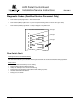
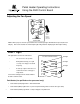
Adjusting the Fan Speed
AUTO
OFF
MANUAL
H
E
A
T
F
A
N
UP
DOWN
UP
DOWN
MANUAL
MANUAL
START
AUGER
TRAVIS INDUSTRIES
HOUSE OF FIRE
TM
Press the
“up” or
“down”
button to
adjust the
fan speed.
NOTE: When you press the Fan speed buttons the “Heat Output” lights will indicate fan speed (not “Heat
Output”). After a few seconds the “Heat Output” lights will go back to displaying the heat output setting.
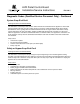
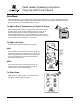
"FAULT" Light
This light comes on when an error occurs:
• The stove runs out of pellets
• During initial start-up (for a split
second) or for improper electrical
frequency
• A start-up sequence that does not
result in the heater coming up to
temperature
To reset the fault light, turn the mode switch to
off and re-start the stove.
HIGH
DISCONNECT POWER BEFORE SERVICE
REMOTE
AUTO
MANUAL
H
E
A
T
O
U
T
P
U
T
MED
LOW
AUGER
FAULT
# 6 Light
# 2 Light
# 4 Light
Fault Codes (for qualified service personnel only)
• Fault and #2 (LOW) Light Flash = Flow Switch Fault
• Fault and # 4 (MED) Light Flash = System Snap Disk Fault (pellets run out & stove goes cold)
• Fault and # 6 (HIGH) Light Flash = Safety or Hopper Snap Disk Fault