
Troubleshooting guide


Copyright © 4/20/2006 Travis Industries, Inc.
11
Auto Mode
Auto mode allows you to use a thermostat to control
room temperature. The stove automatically turns on
when the temperature drops below the thermostat
setting. Once the stove reaches operating temperature,
the stove then runs at the heat output setting selected.
To Adjust Room Temperature
(or Start the Stove)
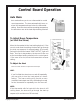
Move the thermostat to the heat setting desired. If the
room is cooler than the setting, the stove will go through
the start-up sequence for approximately 10 minutes.
During this period the lowest “HEAT OUTPUT” light will
flash. Once up to temperature, the stove will then run
at the heat output setting selected on the control panel.
If the room is too hot, move the thermostat to a lesser
setting.
To Adjust the Heat
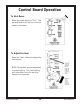
Press the "Heat” buttons to adjust the heat output.
HINT:
If you find that the stove turns on and off repeatedly,
you may wish to turn the heat output to a lesser
setting. The lower setting will provide a more
consistent heat output over time, eliminating the need
for the thermostat to repeatedly turn the stove off.
NOTE:
If the thermostat calls for heat while the stove is still
cooling down, the stove will go through the start-up
sequence (for a minimum of 20 minutes).
Control Board Operation