
Troubleshooting guide
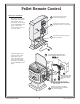
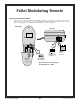





BEFORE YOU BEGIN:
Warning Read all of the safety precautions in the owner’s manual included with your heater
before using this remote control.
MODES OF OPERATION:
The thermostat can be operated in the following modes:
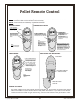
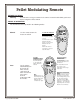
Manual Use the remote to turn the
heater on and off.
ROOM TEMP
°F
°F
SET TEMP
PM
Set
T
im
e
C
a
n
c
e
l
:
A
U
T
O
/
F
H
e
a
t
F
a
n
S
p
e
e
d
O
F
TO TURN THE HEATER ON
AND OFF MANUALLY:
Use the arrow keys to adjust
the temperature up to 90° F
(or 32° C).
To turn the heater on, press
this button until “Auto”
appears. To turn off, press
this button until “Off”
appears.
NOTE: if the room does
reach 90° F. (or 32° C), the
heater will shut off.
Auto Let the remote
automatically turn
the heater on
when it is too
cool, turn it off
when it is too hot.
You set the
desired
temperature with
the remote.
ROOM TEMP
°F
°F
SET TEMP
PM
Set
T
im
e
C
a
n
c
e
l
:
A
U
T
O
/
F
Heat
Fan
Speed
O
F
TO START
THERMOSTAT MODE:
Use this key to toggle
the thermostat mode
on. The display will
indicate “Auto” in the
lower left.
TO ADJUST TARGET
TEMPERATURE:
Use the arrow keys to adjust
the target temperature to the
desired level.
The heater will turn on and
off to keep the room
temperature near the target
temperature.
IMPORTANT OPERATIONAL
NOTE:
The thermostat has a built-in
time delay to keep the heater
from constantly turning on and
off. This means the target
temperature may be slightly
higher (2° or 3°) than the room
temperature – do not adjust the
target temperature – the heater
will turn on in a few minutes.
HINT
:
If your heater turns on
and off frequently, adjust
the flame height down
slightly for a more
consistent heat output.
Pellet Modulating Remote
Copyright © 4/20/2006 Travis Industries, Inc.
12