
Troubleshooting guide

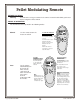




MODES OF OPERATION (continued):
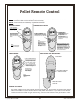
Timed Set the time you wish the
heater to remain on.
ROOM TEMP
°F
°F
SET TEMP
Set
Time
Cancel
A
U
T
O
/
F
H
e
a
t
F
a
n
S
p
e
e
d
O
F
TO SET TO TIMED OPERATION:
a)
b)
c)
Press the “Set” button once.
Use the arrow keys to set the
number of minutes you would
like the heater to stay on (1 to
120 minutes).
Press the Auto On/Off switch
until “Auto” appears.
The heater will turn on and
stay running for the number
of minutes displayed.
NOTE: The remote must be in
“Auto” to remain in timed
mode.
FEATURES:
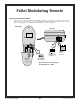
Child-Proof This switch (located behind
the battery cover - see the
illustration on the following
page) disables the buttons on
the front of the remote.
Thermostat and timed
functions are still operational
(but are not adjustable).
The words “Child Proof”
appear here when this features
is turned on.
AAA Battery
A
A
A
B
attery
AAA Battery
ON DIP
1 2 3 4
C-P
This is the “Child Proof” Switch
Slide the
access
cover off.
Child
Proof
Off
Child
Proof
On
°F
°F
• Child Proof •
The child proof switch disables
the buttons on the front of the
remote. Thermostat and timed
functions remain operational.
Back of
Transmitter
PM
:
Pellet Modulating Remote
Copyright © 12/13/2002 Travis Industries, Inc.
13