
Troubleshooting guide
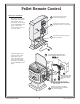





Copyright © 4/20/2006 Travis Industries, Inc.
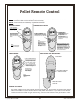
SETTING THE TIME
ROOM TEMP
°F
°F
SET TEMP
PM
Set
Tim
e
Cancel
:
A
U
T
O
/
F
H
e
a
t
F
a
n
S
p
e
e
d
O
F
“Up” and “Down” Buttons
1. Press and hold the “Set” button for 2
seconds.
2. The hour display will flash. Use the “Up”
and “Down” buttons to set the hour.
3. Press the “Set” button again.
4. The minute display will flash. Use the “Up”
and “Down” buttons to set the minute.
5. Press the “Set” button again.
6. The “F” or “C” display will flash. Use the
“Up” and “Down” buttons to select
Fahrenheit or Celsius.
7. Press the “Set” button again. Programming
is complete.
Fahrenheit or
Celcius Display
(will display “F”
or “C”)
“Set” Button
Hour and Minute Display
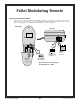
REPLACING THE BATTERIES
Follow the directions to the right to replace the
batteries inside the remote control.
Replace the
batteries
(size AAA).
AAA Battery
A
A
A
B
attery
AAA Battery
ON DIP
1 2 3 4
C-P
Slide the access
cover off.
Pellet Modulating Remote
15