
User Manual



6. Sample data and sample silo
726 Titroprocessor, Instructions for use
9595
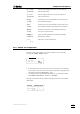
[<-- Out sets the output pointer '<' to the silo line selected
pointer] with the field cursor.
[--> In sets the input pointer '>' to the silo line selected
pointer] with the field cursor.
[Copy copies the silo line selected with the field cursor into
line] the local buffer memory.
[Cut copies the silo line selected with the field cursor into
line] the local buffer memory and deletes the current line.
[Paste inserts the contents of the local buffer memory in
line] front of the current silo line.
[Sample opens the dialog window for defining the sample
idents] identification column.
[ >> switches to the first softkey bar .
>> ]
6.2.1 Sample silo configuration
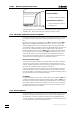
The edit mode of the sample silo can be configured. This is done by
pressing the [Edit mode] softkey.
ÚÄÄÄ Edit mode ÄÄÄÄÄÄÄÄÄÄÄ¿
³ ³
³ AutoCopy on ³
³ Edit direction line ³
³ ³
ÀÄÄÄÄÄÄÄÄÄÄÄÄÄÄÄÄÄÄ QUIT ÄÙ
• If during data input the total contents of a silo line are to be copied into
the next line at the end of each line then the automatic copying function
should be switched on (AutoCopy 'on').
• The sample table can be worked on line by line or column by column.
Select Edit direction 'line' or 'column'.
Settings which differ from the standard settings are shown in the sample
table frame.
³
ÄÄÄ copy; column ÄÄÄ QUIT ÄÙ
ÚÄÄÄÄÄÄÄÂÄÄÄÄÄÄÄÂÄÄÄÄÄÄÄ¿
³Un/Mark³Edit ³ >> ³
³ ³mode ³ >> ³
ÀÄÄÄÄÄÄÄÁÄÄÄÄÄÄÄÁÄÄÄÄÄÄÄÙ