
User's Manual



http://www.microcyber.cn
3
2.2 System Requirements
There are the requirements for PC/portable computer, when to configure the gateway:
Network browser application program (support one of them)
Firefox browser 35 or plus
Chrome browser 40 or plus
Microsoft Internet Explorer 8.0 or plus
Ethernet
10/100base-TX Ethernet communication protocol
2.3 First Setting
2.3.1 Prepare PC/Portable Computer
The user shall configure PC/portable computer before gateway communication, to establish a
private network. The gateway setting shall be found in the PC/portable computer s control panel.
Following are the methods:
1)
Open Network Connections .
2)
Choose Local Area Connection .
3)
Click right click, choose Properties in the list.
4)
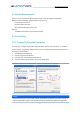
Choose Internet Protocol (TCP/IP), and choose Properties .
Figure 2-1 Local Area ConnectionProperties Figure 2-2 Internet Protocol Properties
Caution
If PC/portable computer is from other network, please down the present IP and other settings, so
that the PC/portable computer shall get back to previous network work after the configuration.