User manual
Manuals
Brands
Microscan Manuals
Barcode Reader
MS-4X
121
122
123
124
125
126
127
128
129
130
6-2
MS-4X Imager
Us
er Manual
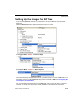
Symbologies by ESP
Symbologies by ESP
T
o change a setting,
double-click
the
setting and use your
cursor to scroll
through the options.
T
o open nested options,
single-clic
k
the
+
.
Click the
Parameters
button and then th
e
Symbologies
t
ab.
1
...
...
124
125
126
127
128
...
...
374