
Operating Instructions



1
1 Getting Started
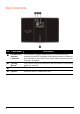
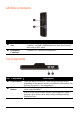
1.1 Understanding Hardware Components
NOTE: Depending upon the specific model purchased, the color of your device may not
exactly match the device shown in this manual.
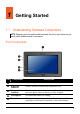
Front Components
Ref Component Description
n
GPS Antenna Receives signals from the GPS satellites overhead.
o
Bluetooth
Indicator
Flashes in blue to indicate that Bluetooth is on.
p
Charge
Indicator
Glows bright amber to indicate that the battery is charging,
and turns green when the battery is fully charged.
q
Microphone For Bluetooth hands-free calling.
r
Touch Screen Displays the output of your device. Tap the screen with your
fingertip to select menu commands or enter information.