
Operating Instructions


106
12.2 Starting and Exiting MioTransfer
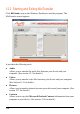
Click MioTransfer icon on the Windows Desktop to start the program. The
MioTransfer screen appears.
It provides the following tools:
z Audio
Allows you to transfer the audio files between your device and your
computer. (See section 12.3 for details.)
z Videos
Allows you to transfer video files between your device and your computer.
(See Section 12.3 for details.)
z Pictures
Allows you to transfer pictures between your device and your computer. (See
section 12.3 for details.)
z Contacts
Allows you to copy the Microsoft Outlook Contacts information from your
computer to your device. (See section 12.4 for details.)